
Se-sal
This engine recreates Se-sal (細箭), a changho whose frame is filled with closely spaced vertical slats, crossed by only three or four horizontal slats at the top, middle and bottom. The name comes from 細 ("fine"), pointing to the slats' slenderness — the fine, straight grain created by those dense vertical slats is the face of this changho. Also called ttisal-chang, it was the most widely used lattice changho form of the Joseon period.
Screen Layout
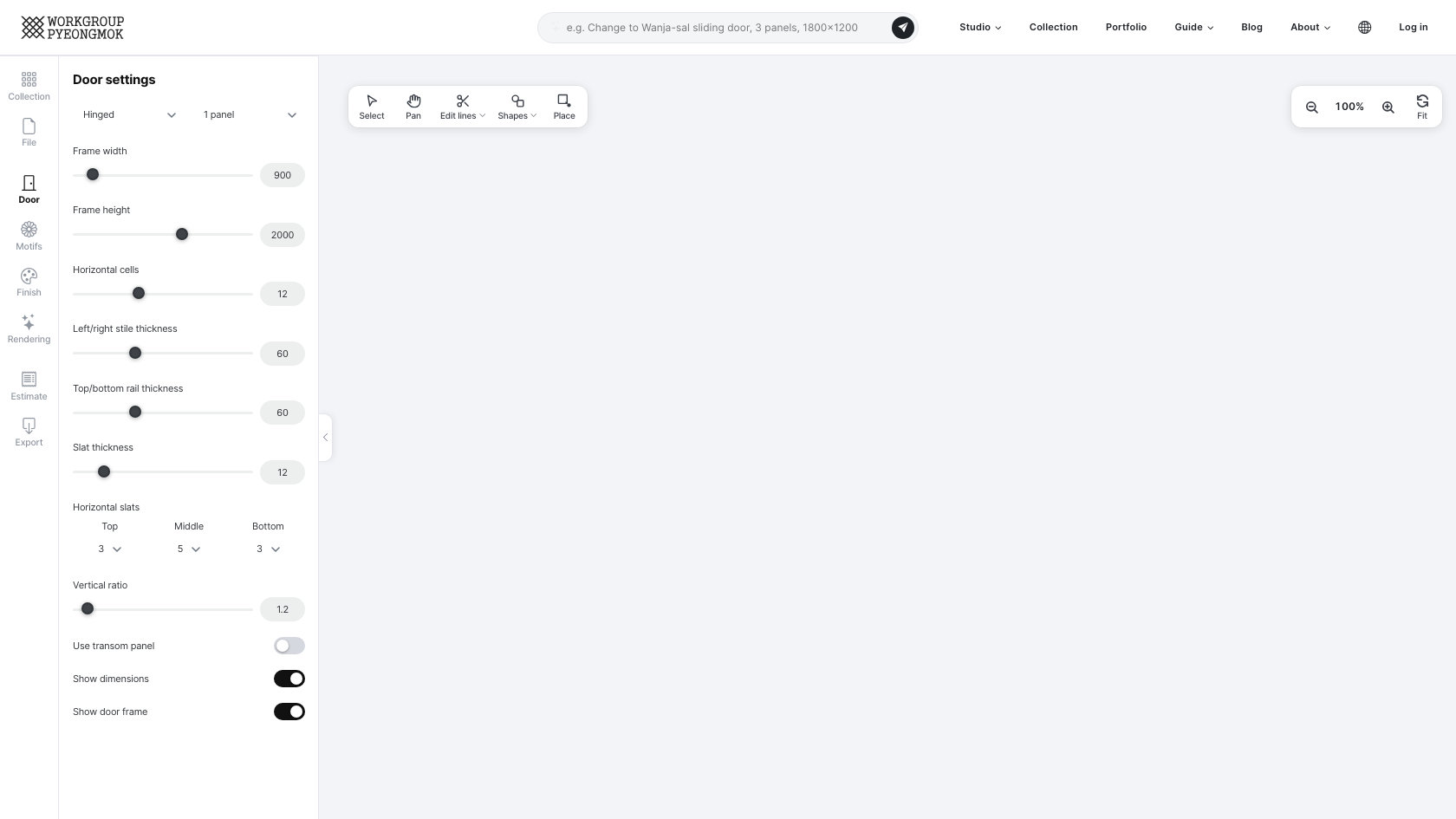
The studio is made up of menu tabs on the left, a tab panel, and the canvas. Click a tab in the menu to open its panel beside it; click the same tab again, or the button on the panel's right edge, to collapse the panel and widen the canvas. Every change you make appears on the canvas immediately.
| Tab | What it does |
|---|---|
| Collection | Search and open collection drawings made with this engine |
| Drawing | Drawing name, save, new drawing, share, versions, and your drawing list |
| Door | Door type and panel count, frame dimensions, lattice settings |
| Motifs | Motif library and SVG upload |
| Finish | Wood, hardware, and finish colors per part |
| Rendering | Room photos, AI rendering and saved results |
| Estimate | Estimated price and lead time, quote request |
| Specs | Production dimensions, ink lines, groove widths, member list |
| Export | Save as PDF · PNG · DXF |
Door Tab — Design Parameters
Door type · panels
| Item | Options | Description |
|---|---|---|
| Door type | Hinged / Sliding | Hinged: hinge construction. Sliding: sliding rail construction |
| Number of panels | Hinged 1–2 · Sliding 1–4, 6 or 8 | The total width is divided evenly as you add panels |
Frame dimensions
| Item | Range | Unit |
|---|---|---|
| Frame width | 400 – 3,000 | mm |
| Frame height | 400 – 5,000 | mm |
Lattice settings
| Item | Description |
|---|---|
| Horizontal cells | Number of horizontal divisions (slat count = cells − 1) |
| Left/right stile width | Width of the left and right outer frame members (mm) |
| Top/bottom rail width | Width of the top and bottom outer frame members (mm) |
| Slat width | Cross-section width of the lattice slats (mm) |
| Horizontal slats (top/middle/bottom) | Set the number of horizontal slats in each of the three zones independently, e.g. 3/5/3 |
| Vertical ratio | Height ratio between the top, middle and bottom zones |
| Use transom panel | Adds a transom panel zone at the top when checked. Its height is set separately |
| Show dimensions | Displays each member's measured dimensions on the canvas when checked |
| Show door frame | Displays the door frame (wall opening) outline on the canvas when checked |
Canvas — Preview & Controls
Above the canvas, the left side holds the Select, Pan, Edit lines, Shapes and Place buttons along with the door and frame sizes, and the right side holds zoom out, zoom in and Fit. These are shared across all seven engines; see the Canvas Toolbar page for the full list and how to use them.
Drawing Tab — Save · Share · Versions
| Item | Function |
|---|---|
| Drawing name | Type a name for the drawing. It is stored in the cloud under this name when saved. |
| Save | Saves the current drawing. Saving under the same name adds a new version. |
| New drawing | Clears the current drawing and starts a new one |
| Share | Creates or turns off a share link for a saved drawing |
| Versions of this drawing | Open an earlier version from the list of saved versions |
| My drawings | Thumbnails of your saved drawings. Click one to switch to it; use to rename it or to delete it |
See Saving & Loading Drawings for details.
Finish Tab — Wood · Color
| Item | Description |
|---|---|
| Wood | The wood species used for the door |
| Hardware | Hinge and handle set. Choose No hardware if you don't need any |
| Part to colour | First pick the part whose color you want to change: Frame · Stile & rail · Slat · Face. |
| Basic | No finish (bare wood) and natural oil finishes such as perilla oil. Oil is applied as a single color that keeps the wood grain. |
| Water-based · oil-based stains | Color swatches per product (water-based stain AURO 560, oil-based stain AURO 930). Clicking a color also selects the finish it belongs to. Hover over a color to see the product and color name. |
See Finishes & Colour Samples for every colour swatch and finish type.
Rendering Tab — Room Photos & AI Rendering
Upload a photo of the site, composite it with your drawing, and render it with AI. See the Using AI Rendering page for details.
Estimate Tab
Shows the estimated price, broken down into wood, labor, hardware, finish and so on, along with the minimum lead time. Shipping and installation are not included, and anything you edited by hand (such as added or deleted lines) is reviewed after you request a quote before the final price is set. The Request quote button at the bottom lets you ask for production right away — see the Ordering Guide.
Specs Tab — Production Dimensions
Measured dimensions calculated automatically from your parameters. (Depending on your membership level, this tab may not be shown.)
| Item | Description |
|---|---|
| Frame width / height | Wall opening dimensions (exactly as entered) |
| Outer width / height | Full door panel size (including stiles and rails), calculated with frame thickness and clearance removed |
| Inner width / height | Effective inner dimensions, excluding stiles and rails |
| Horizontal / vertical cells | Lattice division counts |
| Horizontal / vertical ink lines | Spacing between slat centerlines |
| Half-lap width · groove widths | Machining sizes for the slat half-laps and the grooves in the stiles and rails |
| Member list | Width × thickness × length and count for each stile, rail, slat and frame member |
| Surface area, weight & volume | Volume, jae (才), surface area and weight for the stiles/rails, slats and frame |
Below the member list is a surface area, weight & volume table. For the stiles/rails, slats and frame it shows volume (cm³), jae (才, the traditional Korean lumber unit — 1 jae = 30.3×30.3×3636mm³), surface area (cm²) and weight (kg), with a per-leaf subtotal and a total multiplied by the door count. Weight is only calculated once you pick a wood species on the Finish tab and an admin has entered that species' density (if no density is set, the table is hidden entirely). Painting glass onto a face adds its weight too — plain glass is counted as one continuous pane across the whole inner opening as soon as it's selected as the material (no need to click individual cells), while colored glass is counted only for the cells you actually paint. This table requires a separate viewing permission.
Export Tab
| Button | Output |
|---|---|
| Drawing for printing and the workshop (A4 landscape, with dimensions) | |
| PNG | Drawing image for sharing |
| DXF | Full-scale mm drawing for editing in CAD |
See PDF / PNG / DXF Export for details.
Try designing it yourself in the Se-sal studio.
Open the Se-sal engine